
Instruction manual

Instruction Manual
4
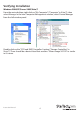
Verifying Installation
Windows 2000/XP/Server 2003/Vista/7
From the main desktop, right-click on “My Computer” (“Computer” in Vista/7), then
select Manage. In the new Computer Management window, select Device Manager
from the left window panel.
Double-click on the “SCSI and RAID Controllers” option (“Storage Controllers” in
Vista/7). There should be a device listed that contains “Silicon Image SiI3132” or similar
in it’s name.