
Instruction manual

Instruction Manual
3
2. Select the option “Install Drivers Automatically (Recommended)” and then click the
Next button.
3. Windows should now start searching for the drivers. Once this has completed, click
the Finish button.
Windows Vista/7/Server 2008 R2 - Fresh OS Install
1. Power up the computer system and insert the Windows Installation DVD.
2. Boot from the DVD and follow the installation instructions, until reaching the screen
to select the destination disk/partition.
3. Click the “Load Drivers” button and insert the Driver Installation CD and browse to
the location of the drivers on the CD.
4. Once the drivers are installed, the drive(s) connected to the controller card should
now be visible.
5. Proceed with the rest of the Windows installation.
Windows Vista/7/Server 2008 R2
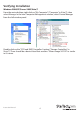
1. When the Found New Hardware window appears on the screen, click on the “Locate
and install drivers software (recommended)” option. If prompted to search online,
select the “Don’t search online” option.
2. When prompted to insert the disc, insert the Driver CD that came with the card, into
your CD/DVD drive and Windows will automatically proceed to search the CD.
3. If a Windows Security dialog window appears, click the “Install this driver software
anyway” option to proceed.
4. Once the driver is installed, click the Close button.