
User Guide





108
Chapter 12
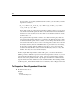
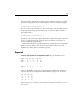
the four weeks of your study (identified as BP1 to BP4), you can define your time-
dependent covariate as
Notice that exactly one of the terms in parentheses will be equal to 1 for any given
case and the rest will all equal 0. In other words, this function means that if time is
less than one week, use BP1; if it is more than one week but less than two weeks,
use BP2, and so on.
For segmented time-dependent covariates, cases that are missing any values are
removed from the analysis. Therefore, you must be sure that all cases have values
for all measured time points on the covariate, even for time points after the case is
removed from the risk set (due to event or censoring). These values are not used in
the analysis, but they must be valid SPSS values to prevent the cases from being
dropped. For example, with the definition given above, a case censored at the
second week must still have values for BP3 and BP4 (they can be 0 or any other
number, since they are not used in the analysis).
In the Compute Time-Dependent Covariate dialog box, you can use the function-
building controls to build the expression for the time-dependent covariate, or you can
enter it directly in the Expression for T_COV_
text area. Note that string constants
must be enclosed in quotation marks or apostrophes, and numeric constants must be
typed in American format, with the dot as the decimal delimiter. The resulting variable
is called T_COV_ and should be included as a covariate in your Cox Regression model.
To Compute a Time-Dependent Covariate
From the menus choose:
Analyze
Survival
Cox w/ Time-Dep Cov...
T_1<() * BP1 T_1 & T_2<≥() * BP2 T_2 & T_3<≥() * BP3
(T_3 & T_4) * BP4<≥+
++