
User Manual



17
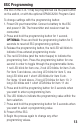
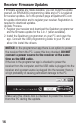
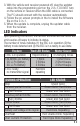
3. With the vehicle and receiver powered off, plug the updater
cable into the programming port on the 2-in-1. DO NOT turn
on the vehicle or receiver when the USB cable is connected.
The PC should connect with the receiver automatically.
4. Follow the on screen prompts in the to install the firmware
file on the 2-in-1.
5. When the update is complete, unplug the updater cable
from the receiver.
LED Indicators
Upon powering ON the ESC, the red LED will blink and the motor will
emit a series of beeps to indicate its status.
The number of tones indicates (1) the ESC is in operation (2) the
battery mode detected and (3) the ESC is in a ready-to-use state.
Feature Red LED Status Motor Sound
1. ESC is in operation
Rapid blinking 4 Changing tones
2. Ni-MH/Ni-CD Battery
2S Li-Po Battery
3S Li-Po Battery
1 Blink
2 Blinks
3 Blinks
1 Short tone
2 Short beeps
3 Short beeps
3. ESC ready
no transmitter signal
Red blink
repeating
DURING OPERATION LED STATUS
Stop Green Solid
Forward partial throttle Green Solid, Red Blinks
Full Throttle Green and Red Solid
Reverse partial throttle Green Solid, Red Blinks
Full Throttle Green and Red Solid
Partial Brake Green Solid, Red Blinks
Full Brake Green and Red Solid
Battery Low Voltage or No Signal
Red Blink Repeating
Overheat Red Double Blink Repeating
Over Current Protection Red Triple Blink Repeating