Spektrum Firma 25A Brushed Smart ESC with Dual Protocol Receiver Spektrum Firma 25A gebürsteter SMART-Geschwindigkeitsregler mit DualProtokoll-Empfänger Variateur ESC Smart à balais Spektrum Firma 25 A avec récepteur double protocole Spektrum Firma 25 A Smart ESC a spazzole con ricevitore a doppio protocollo
NOTICE All instructions, warranties and other collateral documents are subject to change at the sole discretion of Horizon Hobby, LLC. For up-to-date product literature, visit horizonhobby.com or towerhobbies.com and click on the support or resources tab for this product.
WARNING: Read the ENTIRE instruction manual to become familiar with the features of the product before operating. Failure to operate the product correctly can result in damage to the product, personal property and cause serious injury. This is a sophisticated hobby product. It must be operated with caution and common sense and requires some basic mechanical ability. Failure to operate this Product in a safe and responsible manner could result in injury or damage to the product or other property.
Waterproof Component Your new Horizon Hobby® Spektrum™ 25A Brushed Waterproof 2-in-1 ESC and Dual Protocol Receiver has been designed and built to allow you to operate the product in many “wet conditions”, including puddles, creeks, wet grass, snow and even rain. While waterproof, this component has not been designed to be immersed in water for long periods of time and should NOT be treated like a submarine.
Usage Conditions Your ESC will operate successfully in any of the following, individual-usage scenarios: • 2 hours continuous operation in damp grass or vegetation. • 2 hours continuous operation in heavy fog (95% humidity, saturated air, condensing water). • 1 hour continuous operation in light rain (<0.10 in/2.5mm per hour). • 15 minutes continuous operation in heavy rain (>0.30 in/7.6mm per hour). • 1 hour continuous operation in light sleet (<0.10 in/2.5mm per hour).
Contents Features ...........................................................................6 Diagram ...........................................................................8 Installation ........................................................................9 Binding ...........................................................................10 ESC and Transmitter Calibration .........................................11 Operation .........................................................................
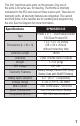
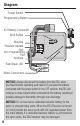
This 2in1 has three servo ports on the receiver. Only one of the ports is for servo use, for steering. The throttle is internally connected to the ESC and does not have a servo port. There are no telemetry ports, all telemetry features are integrated. The second and third ports on the receiver are for updating and programming the unit. See the Diagram for more information.
Diagram Power Switch Programming Button IC2 Battery Connector Bind Button Steering Receiver Update Port ESC Programming Port Antenna - + Red/Green LED Motor Connectors NOTICE: Always disconnect the battery from the ESC when you have finished operating your vehicle. If you leave the battery connected with the power switch in the OFF position, the ESC will continue to draw current when connected to the battery, resulting in possible damage to the battery through over-discharge.
Installation 1. Determine how to mount the ESC/Receiver as specified by your vehicle’s instruction manual, or in an area with adequate airflow and protection from damage. Ensure all wiring connections can be reached prior to mounting. For the best reception performance choose a mounting arrangement that will put the antenna as high as possible in the vehicle, away from metal or carbon fiber. 2.
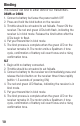
Binding This receiver can bind to either DSM or SLT transmitters. DSMR or DSM2 1. Connect a battery but leave the power switch OFF. 2. Press and hold the bind button on the receiver. 3. Throttle should be at neutral to set failsafe. Power ON the receiver. The red and green LEDs both flash, indicating the receiver is in bind mode. Release the bind button after the LEDs begin to flash. 4. Put your transmitter in bind mode. 5. The bind process is complete when the green LED on the receiver remains lit.
ESC and Transmitter Calibration When using a new ESC it is important to calibrate it so the ESC matches the throttle range on your transmitter. If you install a new radio system, or make changes to your throttle/brake values in your transmitter, you must redo the ESC Calibration Process. Failure to calibrate the ESC to your radio system will result in the ESC not working correctly. Set the Fail Safe on your radio to a neutral position to ensure the motor stops in the event of a signal loss. 1.
7. Power OFF the system with the ON/OFF switch. 8. Power ON the system with the ON/OFF switch. The system is ready for operation Tip: Beeps from the motor may be quiet and difficult to hear, use the LED status to help verify settings. Operation 1. Power on the transmitter. 2. Power on the receiver. 3. The green LED on the receiver will be illuminated when it is connected to your transmitter. 4. Disconnect your battery from the ESC/Receiver after operation.
ESC Programming The ESC in the 2-in-1 may be programmed via the push button on the switch, or with the optional SPMXCA200 Program Card. To change settings with the programming button: 1. Power ON your transmitter. Connect a battery to the ESC and power it ON. The transmitter and receiver must be connected. 2. Press and hold the programming button for 1 second. OPTIONAL: Press and hold the programming button for 5 seconds to reset all ESC programming options. 3.
To change settings with the programming box: 1. Begin with no battery connected. 2. Connect the cable for the programming box into the programming port as shown. 3. Connect a battery and power ON the ESC. OPTIONAL: The ESC settings can be reset to default by pressing “Reset” and then “OK” buttons. 4. Press Select button on the program box once. 5. Select the programming choices. Press SAVE after any changes are made. 6. Power off the ESC. 7. Disconnect the cable for the programming box.
Programmable Values 1 2 3 1. Fwd/ Fwd/ Fwd/ Brk Rev/ Rev Brk 2. Li-Po NiMH 4 5 6 7 8 9 8 10 12 14 16 100 Auto Auto Auto (low) (Med) (High) 3. Off 4. 0 2 4 6 5. 25 50 75 100 6. 25 50 75 100 7. 0 12 25 37 50 62 75 87 8. 0 6 12 18 25 31 37 43 50 9. 0 5 10 50 60 70 80 90 100 10. 1 2 3 4 5 6 7 8 9 11. 3 4 5 6 7 8 9 10 12 5 6 7 8 9 12. 1 2 3 4 13. 1K 2K 4K 8K 16K 14.
Receiver Firmware Updates If firmware updates are made available, you can install the update yourself. An SPMA3065 programming cable and a PC is required for receiver updates. Go to the product page at SpektrumRC.com for update information and to register your receiver. Registration is required to download updates. Update Process 1. Register your receiver and download the Spektrum programmer and the firmware update for the 2-in-1 (when available). 2.
3. With the vehicle and receiver powered off, plug the updater cable into the programming port on the 2-in-1. DO NOT turn on the vehicle or receiver when the USB cable is connected. The PC should connect with the receiver automatically. 4. Follow the on screen prompts in the to install the firmware file on the 2-in-1. 5. When the update is complete, unplug the updater cable from the receiver.
Receiver Troubleshooting Guide Problem The system will not connect The receiver goes into failsafe a short distance away from the transmitter The receiver stops responding during operation 18 Possible Cause Your transmitter and receiver are too close together You are near metal objects The receiver is bound to a different model memory Your transmitter was placed into bind mode and is no longer bound to your receiver Check for damage on the receiver antenna Low receiver battery voltage.
Telemetry Troubleshooting Guide Problem No telemetry options are available in the transmitter Possible Cause You are using a transmitter that does not include telemetry features Your transmitter is in 5.
Motor- Does not turn dam- Repair/replace wiring or continuously ESC/motor motor/ESC in response aged to throttle Adjust throttle travel/other MotorIncorrect settings on the Slows but transmitter/ESC throttle transmitter/ESC.
1-YEAR LIMITED WARRANTY What this Warranty Covers - Horizon Hobby, LLC, (Horizon) warrants to the original purchaser that the product purchased (the “Product”) will be free from defects in materials and workmanship for a period of 1 year from the date of purchase.
Limitation of Liability HORIZON SHALL NOT BE LIABLE FOR SPECIAL, INDIRECT, INCIDENTAL OR CONSEQUENTIAL DAMAGES, LOSS OF PROFITS OR PRODUCTION OR COMMERCIAL LOSS IN ANY WAY, REGARDLESS OF WHETHER SUCH CLAIM IS BASED IN CONTRACT, WARRANTY, TORT, NEGLIGENCE, STRICT LIABILITY OR ANY OTHER THEORY OF LIABILITY, EVEN IF HORIZON HAS BEEN ADVISED OF THE POSSIBILITY OF SUCH DAMAGES. Further, in no event shall the liability of Horizon exceed the individual price of the Product on which liability is asserted.
Inspection or Services If this Product needs to be inspected or serviced and is compliant in the country you live and use the Product in, please use the Horizon Online Service Request submission process found on our website or call Horizon to obtain a Return Merchandise Authorization (RMA) number. Pack the Product securely using a shipping carton. Please note that original boxes may be included, but are not designed to withstand the rigors of shipping without additional protection.
Non-Warranty Service Should your service not be covered by warranty, service will be completed and payment will be required without notification or estimate of the expense unless the expense exceeds 50% of the retail purchase cost. By submitting the item for service you are agreeing to payment of the service without notification. Service estimates are available upon request. You must include this request with your item submitted for service.
Warranty and Service Contact Information Country of Horizon Hobby Contact Information Address Purchase Horizon Service Center servicecenter.horizonhobby. (Repairs and com/RequestForm/ 2904 Repair Requests) Research Rd. United Horizon Product productsupport@horizonhobby. Champaign, States of Support com. Illinois, America (Product Techni877-504-0233 61822 USA cal Assistance) websales@horizonhobby.
interference to radio communications. However, there is no guarantee that interference will not occur in a particular installation. If this equipment does cause harmful interference to radio or television reception, which can be determined by turning the equipment off and on, the user is encouraged to try to correct the interference by one or more of the following measures: • Reorient or relocate the receiving antenna. • Increase the separation between the equipment and receiver.
Compliance Information for the European Union EU Compliance Statement: SPMXSER1025 Hereby, Horizon Hobby, LLC declares that the device is in compliance with the following: EU Radio Equipment Directive 2014/53/EU; RoHS 2 Directive 2011/65/EU; RoHS 3 Directive - Amending 2011/65/EU Annex II 2015/863. The full text of the EU declaration of conformity is available at the following internet address: https://www.horizonhobby. com/content/support-render-compliance. Frequency Band: 2402 - 2478 MHz Max EIRP: 1.
© 2022 Horizon Hobby, LLC. Firma, the Firma Logo, IC3, EC3, DSM2, DSMR, the Smart Technology logo, and the Horizon Hobby logo are trademarks or registered trademarks of Horizon Hobby, LLC. The Spektrum trademark is used with permission of Bachmann Industries, Inc. All other trademarks, service marks and logos are property of their respective owners. US 9,930,567. US 10,419,970.