
Instruction Manual





29SPEKTRUM DX3R PROGRAMMING GUIDE
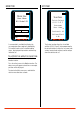
swITCh seleCT
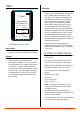
The Switch select function allows any of the six
available switches (A, B, C, D, E and F) to be
assigned one of the following functions:
Sw it ch
Us er N am e
01 : M od e l 01
A- T hr T r im +
B- S tr T r im +
C- A ux L i n +
D- S tr S / R +
E- B ra ke +
F- T im er
≤
Inhibit Switch/ button turned off
Aux 3P Channel three functions as a three-
position output
Aux 2P Channel three functions as a two-
position output
Aux Lin- Channel three functions as a
linear output
Brake Full brake trim
Thr Exp Throttle exponential
Thr Trim Throttle trim—Adjusts the neutral
throttle position
S/R Override Steering override
Str Exp Steering exponential
Str S/R Steering rate
Str Trim Steering trim
Timer Activates up or count down timer
To prograM a swITCh or buTTon:
Highlight the desired switch/ button and press the
roller. Use the roller to select the desired function
from the list above.
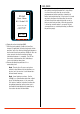
Note: A positive + or negative – value is
available for many of the above functions
allowing the reversing of the switch direction.
user naMe
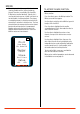
A user name with up to ten characters can be
programmed and the name is displayed on the
Main screen.
To prograM a user naMe:
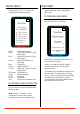
In the System screen highlight the User Name and
press the roller to access the function.
Sy st em
Sw it ch S e le ct
A B C D E F
Us er na me
◊
Co nt ra st : 10
Vo lt ag e A le rt
4. 0v
Ra ce r X
≤
Use the roller to select the position, then press the
roller to access the character.
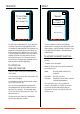
Contrast is adjustable from 0 to 30. Highlight
the Contrast function then scroll the roller to
adjust the contrast.
The Voltage Alert sets the voltage threshold at which
the alarm sounds. The default setting is 4.0 volts,
however, if you wish to change this setting, highlight
the Voltage Alert function and press the roller.
Scrolling the roller will allow the voltage threshold
to be adjusted from 0.0 to 6.5 volts.