
User Guide Network Adapter Spectra 12000


Chapter 5. Configuring the Spectra 12000 S-QIP 49
Configuring S-QIPs
The Library Controller allows the user to configure SCSI controllers (S-
QIPs) in a number of ways. To configure S-QIPs:
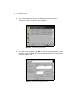
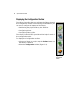
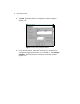
1. From the Configuration toolbar, select the Partitions icon. This brings
up the Shared Library Services screen.
2. Select the partition with the controller you want to configure.
Figure 5-2 The Shared Library Services screen.