The SOYO CD Quick Start Guide Hardware Installation Motherboard Quick BIOS Setup SY-KT333 DRAGON Lite Introduction
SOYO™ SY-KT333 DRAGON Lite Motherboard TM AMD® K7 Athlon & Duron processors VIA KT333 AGP/PCI Motherboard 100/133 MHz Front Side Bus supported ATX Form Factor Copyright © 2002 by SOYO Computer Inc. Trademarks: SOYO is a registered trademark of SOYO Computer Inc. All trademarks are properties of their owners. Product Rights: All names of the product and corporate mentioned in this publication are used for identification purposes only.
1 Introduction Congratulations on your purchase of the SY-KT333 DRAGON Lite motherboard. This Quick Start Guide illustrates the steps for installing and setting up your new motherboard. This guide provides all users with the basic steps of motherboard setting and operation. For further information, please refer to the SY-KT333 DRAGON Lite motherboard User’s Manual that came with your motherboard.
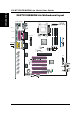
SY-KT333 DRAGON Lite Quick Start Guide Introduction SY-KT333 DRAGON Lite Motherboard Layout PS/2 KB PS/2 Mouse Connector Connector USB 1_2 COM 1 ATX Power COM 2 PRT LINE-OUT LINE-IN MIC IDE 1 IDE 2 GAME PORT AGP Slot H/W Audio PCI Slot #1 1 FDC1 4 PCI Slot #2 JP44 WOL VT8233A □ 3 PCI Slot #3 1 Header Super I/O PCI Slot #4 USB 2.
Key Features Supports Socket A AMD®K7 processors - Supports 200/266 MHz Front Side Bus Athlon /XP CPU (750MHz ~ 2100+) Supports suspend to RAM (STR) Supports 5 sets of voltage monitoring On-board hardware audio - Duron /Morgan CPU (650MHZ ~ 1.
SY-KT333 DRAGON Lite Quick Start Guide 2 Installation Installation To avoid damage to your motherboard, please follow these simple rules while handling this equipment: Before handling the motherboard, ground yourself by touching on to an unpainted portion of the system's metal chassis. Remove the motherboard from its anti-static packaging. Hold the motherboard by the edges and avoid touching its components. Check the motherboard for damage.
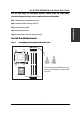
SY-KT333 DRAGON Lite Quick Start Guide We will now begin the installation process. Please follow the step-by-step procedure designed to lead you to a complete and correct installation. Step 1- Assembling the motherboard to the case Step 2- Install the Central Processing Unit (CPU) Installation Step 3- Install memory modules Step 4- Install expansion cards Step 5- Connect cables, case wires, and power supply Install the Motherboard Step 1.
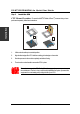
SY-KT333 DRAGON Lite Quick Start Guide Step 2. Install the CPU CPU Mount Procedure: To mount the AMD®K7 Athlon & DuronTM processor that you have purchased separately, follow these instructions. Installation 1 2 3 4 1. Lift the socket handle up to a vertical position. 2. Align the blunt edge of the CPU with the matching pinhole edge on the socket. 3. Seat the processor in the socket completely and without forcing. 4. Then close the socket handle to secure the CPU in place.
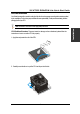
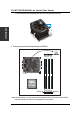
SY-KT333 DRAGON Lite Quick Start Guide CPU Fan Installation Your SocketAprocessor kit comes with a cooling fan. Mount the fan on the processor according to the instructions provided by the manufacturer. The fan is a key component that wil ensure system stability. The fan prevents overheating, therefore prolonging the life of your CPU. CPU Fan Mount Procedure: To prevent scratch or damage on the motherboard, please follow the instructions on how to mount the CPU fan properly. 1.
SY-KT333 DRAGON Lite Quick Start Guide Installation 3. Clip-on the second lock and please make sure not to damage/scratch the board. 2 4. The fans power connector should be connected to CPUFAN1. DIMM3 DIMM1 Note: If the fan is defective or power connector is not connected to CPUFAN1, the system will enable Fan Off Control function. See below for more information on FOC function.
SY-KT333 DRAGON Lite Quick Start Guide The newly designed SOYO “FOC” is based on the concept of total protection for CPU, which is very different from currently seen on the market. The H/W control function is used to see a passive security system of monitoring and warning. S/W Simultaneous Signal Follow-ups techniques and Auto Power Off System are included to prevent all possible damage caused by the malfunctioning of the CPU fan.
SY-KT333 DRAGON Lite Quick Start Guide Configure Memory Your board comes with three DIMM sockets, providing support for up to 3GB of main memory using unbuffered and non-ECC DIMM modules from 64MB to 1GB. On this motherboard, DRAM speed can be set independent from the CPU front side bus speed. Depending on the DRAM clock speed setting in the BIOS setup, appropriate memory modules must be used.
SY-KT333 DRAGON Lite Quick Start Guide Connectors and Plug-ins Pin4 Pin1 Pin2 Pin3 Pin5 Pin6 Pin7 VCC NC IRRX GND IRTX VCC NC Pin6 SMCARDCN Pin7 Pin8 Pin9 Pin10 Pin11 Pin1 Pin2 Pin3 Pin4 Pin5 VCC NC Scrfet RST NC NC Pin8 Pin9 Wake-On-LAN Header: JP44 Pin1 Pin2 Pin3 Pin10 5V-SB CIRRX GND CIRTX CLK NC NC Scrio Pin2 Data(-) Pin3 Data(+) Pin4 GND Pin6 Power CPU Cooling Fan: CPUFAN1 Pin1 Pin2 Pin3 GND 12V SENSOR Pin12 Pin13 Pin14 GND Scrpres USB3 Pin1 Power GND MP_Wakeup
SY-KT333 DRAGON Lite Quick Start Guide CMOS Clear (JP5) Installation In some cases the CMOS memory may contain wrong data, follow the steps below to clear the CMOS memory. 1. Put the jumper back to 1-2 to allow writing of new data into the CMOS memory. 2. Clear the CMOS memory by momentarily shorting pin 2-3 on jumper JP5. This jumper can be easily identified by its white cap.
SY-KT333 DRAGON Lite Quick Start Guide 3 Quick BIOS Setup This motherboard does not use any hardware jumpers to set the CPU frequency. Instead, CPU settings are software configurable with the BIOS [SOYO COMBO FEATURE]. The [SOYO COMBO FEATURE] combines the main parameters that you need to configure, all in one menu, for a quick setup in BIOS.
SY-KT333 DRAGON Lite Quick Start Guide 4 The SOYO CD The SOYO-CD will Auto Run only in Windows Base Operating System . Your SY-KT333 DRAGON Lite motherboard comes with a CD-ROM labeled "SOYO CD." The SOYO CD contains a. The user's manual for your new motherboard -in PDF format, b. The drivers software available for installation, and c. A database in HTML format with information on SOYO motherboards and other products. Step 1.
The user's manual files included on the SOYO CD are in PDF (Postscript Document) format. In order to read a PDF file, the appropriate Acrobat Reader software must be installed in your system. Note: The Start Up program automatically detects if the Acrobat Reader utility is already present in your system, and otherwise prompts you on whether or not you want to install it. You must install the Acrobat Reader utility to be able to read the user's manual file.
SY-KT333 DRAGON Lite Quick Start Guide driver revision: VIA 4 in 1 Driver Package for Win 9x/ME/NT/2k/XP C-MEDIA 4-channel onboard audio Driver/Application for Win 9x/ME/2000/NT/XP KT333 DRAGON Lite hardware monitor for Win 9x/ME/2000/NT/XP KT333 DRAGON Lite ITE SIM card reader driver for Win 9x/ME/2000/NT/XP(english) C-MEDIA 4-channel onboard audio Driver for NT4.
SY-KT333 DRAGON Lite Quick Start Guide C-MEDIA 4-channel Onboard Audio Driver/Application for Win 9x/ME/ 2000/NT/XP 1. The driver supports 2/4/6 speakers 3D positional audio. 2. The application is include CD Player/MIDI Player/MP3/Wave Player/Mixer with the control over your PC’s audio functions. KT333 DRAGON Lite hardware monitor for Win 9x/ME/2000/NT/XP Your motherboard comes with a hardware monitoring IC. By installing this utility Temperature, Fan speed and Voltages can be monitored.
SY-KT333 DRAGON Lite Quick Start Guide 5 Audio Driver Installation Audio Driver Installation for Windows 98/98se. After you have installed the audio driver, windows may prompt you to restart your computer. When your computer restarted it may look for windows driver from your Win98CD and ask you to insert your Win98/98se CD to your CD-drive. At this point you need to insert the Win98 CD to your CD-drive and type in D:\win98 (assuming your CD-Rom in driver D).
SY-KT333 DRAGON Lite Quick Start Guide Quick Trouble shoot tips Boot-up Issues The system do not power-up, no beeping sound heard and the CPU fan does not turn on. 1. Check if the power cord is plug to the power source. 2. Check if the power is connected to the M/B. 3. Check if the cable of the case power button is connected to the M/B power button connector (see connectors and plug-ins in the manual for more info). 4. Make sure the power supply is not defective. Change the power supply.
SY-KT333 DRAGON Lite Quick Start Guide 4. If you already checked the power supply specification, change the power supply it might be defective. The minimum is 250 watts. When I boot up my system, everything works fine, it sees my CPU and memory, detects my hard drive, floppy drive and CD-ROM but locks up at "Verify DMI pool data... ". Don't go any further. What should I do? 1. Clear CMOS battery. (JP5 connector, see Quick start guide for more info on how to clear the CMOS). 2.
SY-KT333 DRAGON Lite Quick Start Guide My system intermittently locks up, during Windows installation. 1. Go to BIOS and load “load optimized default”. 2. Check website for any BIOS update. 3. If still has the problem, remove all other add-on cards except CPU/Memory/ Video card/Hard disk. See if you can finish Windows installation. Then put peripherals in one by one to identify which one cause the lockup. My system will not boot-up when I set my CPU to 133MHz FSB, works with 100MHz FSB 1.
SY-KT333 DRAGON Lite Quick Start Guide VGA Issue I cannot set my VGA to go higher than 16 color (640x 480). 1. Make sure that you have installed the VIA 4 in 1 driver. 2. Install/ re-install the VGA driver. After wake-up from Suspend to RAM or Standby mode, the screen has no display but I can hear the hard disk operating 1. Install VIA 4 in 1 driver. 2. Check the VGA card manufacturer for driver update, or make sure the VGA card support Suspend to Ram function.
SY-KT333 DRAGON Lite Quick Start Guide Hard disk/FDD/CD-ROM issue My Western digital HDD is not detected during boot-up Change the jumper settings to cable select or single. Sometimes the system finds my CD-ROM, sometimes not 1. Check CD-ROM if it is working properly. 2. The power supply might not have enough wattage to support all the peripherals. If your system has other peripherals connected, like CD-RW, extra HDD, etc. disconnect them.
SY-KT333 DRAGON Lite Quick Start Guide How to contact us: If you are interested in our products, please contact the SOYO sales department in the region you live. If you require Technical Assistance, please contact our Technical Support in the region you live. SOYO prefers Email as communication medium, remember to always add to the email the country that you live in. TAIWAN Hong Kong SOYO COMPUTER INC. SOYO ASIA LTD. No. 21 Wu-Kung 5 Rd., Hsing Chuang City, Taipei Hsien, Taiwan, R.O.C.
Edition: July 2002 Version 1.