
user manual




Sony Notebook User Guide
Using your notebook
33
nN
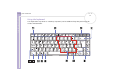
Combinations and functions with the <Windows> key
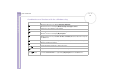
Combinations Functions
+ F1
Windows
®
2000 Professional: Displays Windows 2000 Help.
Windows
®
XP Professional: Displays Windows Help and Support Centre.
+ Tab
Switches the selected button on the taskbar.
+ E
Windows
®
2000 Professional: Displays Windows Explorer.
Windows
®
XP Professional: Displays My Computer.
+ F
Displays the search window to find a file or folder. This is equivalent to selecting Search
(Windows
®
XP Professional) or Search - For files or Folders (Windows
®
2000 Professional) from
the Start menu.
+ Ctrl + F
Displays the Search Results - Computers window where you can locate other computers.
+ M
Minimises all displayed windows.
Shift + + M
Returns all minimised windows to their previous size.
+ R
Displays the Run window. This is equivalent to selecting Run from the Start menu.
<Fn> + + Insert
Displays the System Properties window. This is equivalent to double-clicking the System
icon in the Control Panel or to right-clicking My Computer from the Start menu.