
Operating Guide
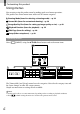
Table Of Contents
- Cover
- GB
- IMPORTANT SAFETY INSTRUCTIONS
- Read this first
- Table of contents
- Getting started
- Binoculars/Recording/Playback
- Saving movies and photos
- Customizing this product
- Additional information
- Quick reference
- FR
- Lisez ceci avant tout
- Table des matières
- Préparation
- Jumelles/Enregistrement/Lecture
- Enregistrement de films ou de photos
- Personnalisation de cet appareil
- Informations complémentaires
- Référence rapide
- FRCA
- CONSIGNES DE SÉCURITÉ IMPORTANTES
- Table des matières
- Comment démarrer
- Jumelles/Enregistrement/Lecture
- Sauvegarde de films et de photos
- Personnalisation de ce product
- Informations complémentaires
- Référence rapide
- ES
- Lea esto antes de empezar
- Índice de contenido
- Introducción
- Binoculares/grabación/reproducción
- Guardar películas y fotografías
- Personalizar el producto
- Información complementaria
- Referencia rápida
- ESUS
- Lea este apartado en primer lugar
- Índice
- Procedimientos iniciales
- Binoculares/Grabación/Reproducción
- Almacenamiento de películas y fotos
- Personalización del producto
- Información complementaria
- Referencia rápida
- GB

38
GB
Customizing this product
Using menus
You can enjoy using this product more by making good use of menu operations.
This product has various menu items under each of 6 menu categories.
Shooting Mode (Items for selecting a shooting mode) p. 39
Camera/Mic (Items for customized shooting) p. 39
Image Quality/Size (Items for setting up image quality or size) p. 40
Playback Function (Items for playback) p. 32
Edit/Copy (Items for editing) p. 40
Setup (Other setup items) p. 40
Operating menus
Select (MENU) using the ////Enter buttons and set the menu items.
The [Camera/Mic] and [Setup] menus have sub-categories. Select the sub-category icon, and
the screen changes to other sub-category menus.
Grayed out menu items or settings are not available.
Notes
You may not be able to set some menu items, depending on the recording or playback conditions.
Select
to finish setting the menu or to return to the previous menu screen.
Sub-category icons