
Operating Guide
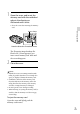
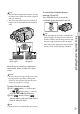
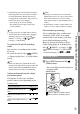
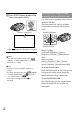
Table Of Contents
- Cover
- GB
- IMPORTANT SAFETY INSTRUCTIONS
- Read this first
- Table of contents
- Getting started
- Binoculars/Recording/Playback
- Saving movies and photos
- Customizing this product
- Additional information
- Quick reference
- FR
- Lisez ceci avant tout
- Table des matières
- Préparation
- Jumelles/Enregistrement/Lecture
- Enregistrement de films ou de photos
- Personnalisation de cet appareil
- Informations complémentaires
- Référence rapide
- FRCA
- CONSIGNES DE SÉCURITÉ IMPORTANTES
- Table des matières
- Comment démarrer
- Jumelles/Enregistrement/Lecture
- Sauvegarde de films et de photos
- Personnalisation de ce product
- Informations complémentaires
- Référence rapide
- ES
- Lea esto antes de empezar
- Índice de contenido
- Introducción
- Binoculares/grabación/reproducción
- Guardar películas y fotografías
- Personalizar el producto
- Información complementaria
- Referencia rápida
- ESUS
- Lea este apartado en primer lugar
- Índice
- Procedimientos iniciales
- Binoculares/Grabación/Reproducción
- Almacenamiento de películas y fotos
- Personalización del producto
- Información complementaria
- Referencia rápida
- GB

25
GB
Getting started
1
Open the cover, and insert the
memory card with the nothched
edge in the direction as
illustrated until it clicks.
Close the cover after inserting the memory
card.
The [Preparing image database file.
Please wait.] screen appears if you
insert a new memory card. Wait until
the screen disappears.
2
Close the cover.
Notes
If [Failed to create a new Image Database File.
It may be possible that there is not enough free
space.] is displayed, format the memory card.
Confirm the direction of the memory card.
If you forcibly insert the memory card in the
wrong direction, the memory card, memory
card slot, or image data may be damaged.
Do not open the cover during recording.
When inserting or ejecting the memory card, be
careful so that the memory card does not pop
out and drop.
To eject the memory card
Open the cover and lightly push the
memory card in once.
Access lamp
Note the direction of notched corner.