
Operating Guide
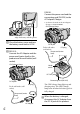
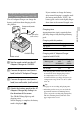
Table Of Contents
- Cover
- GB
- IMPORTANT SAFETY INSTRUCTIONS
- Read this first
- Table of contents
- Getting started
- Binoculars/Recording/Playback
- Saving movies and photos
- Customizing this product
- Additional information
- Quick reference
- FR
- Lisez ceci avant tout
- Table des matières
- Préparation
- Jumelles/Enregistrement/Lecture
- Enregistrement de films ou de photos
- Personnalisation de cet appareil
- Informations complémentaires
- Référence rapide
- FRCA
- CONSIGNES DE SÉCURITÉ IMPORTANTES
- Table des matières
- Comment démarrer
- Jumelles/Enregistrement/Lecture
- Sauvegarde de films et de photos
- Personnalisation de ce product
- Informations complémentaires
- Référence rapide
- ES
- Lea esto antes de empezar
- Índice de contenido
- Introducción
- Binoculares/grabación/reproducción
- Guardar películas y fotografías
- Personalizar el producto
- Información complementaria
- Referencia rápida
- ESUS
- Lea este apartado en primer lugar
- Índice
- Procedimientos iniciales
- Binoculares/Grabación/Reproducción
- Almacenamiento de películas y fotos
- Personalización del producto
- Información complementaria
- Referencia rápida
- GB

19
GB
Getting started
Charging the battery pack using
the AC Adaptor/Charger (DEV-5K)
The AC Adaptor/Charger can charge the
battery pack faster than charging it with
this product.
Set the mode switch on the AC
Adaptor/Charger to CHARGE.
Connect the power cord (mains
lead) to the AC Adaptor/Charger.
Connect the power cord (mains
lead) to a wall outlet (wall socket).
Attach the battery pack to the AC
Adaptor/Charger by sliding it in
the direction of the arrow.
The CHARGE lamp lights up and
charging starts.
When charging is complete, the battery
mark is displayed (
).
If you continue to charge the battery
after normal charging is complete until
the battery mark shows “FULL,” the
battery pack can be used slightly longer
than when in the normal charged state.
Charging time
Approximate time (min.) required when
you fully charge a fully discharged battery
pack.
Charging with this product
Battery pack Charging time
NP-FV70 195
NP-FV100 390
Charging with AC Adaptor/Charger
(supplied with DEV-5K)
Battery pack
Charging
time
(NORMAL)
Charging
time
(FULL)
NP-FV70 70 130
NP-FV100 125 185
The charging times shown in the table above
are measured when charging this product
at a temperature of 25
C (77 °F). It is
recommended that you charge the battery in
a temperature range of 10
C to 30 C (50 °F
to 86 °F).
Tips
See page 44 on recording and playing time.
When this product is on, you can check the
approximate amount of remaining battery
power (expected recording and playing time)
with the remaining battery indicator at the
upper right on the screen.
To the wall outlet
(wall socket)
Power cord (mains
lead)
Mode switch
CHARGE lamp