
Operating Guide
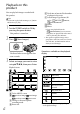
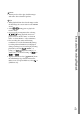
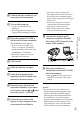
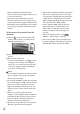
Table Of Contents
- Cover
- GB
- IMPORTANT SAFETY INSTRUCTIONS
- Read this first
- Table of contents
- Getting started
- Binoculars/Recording/Playback
- Saving movies and photos
- Customizing this product
- Additional information
- Quick reference
- FR
- Lisez ceci avant tout
- Table des matières
- Préparation
- Jumelles/Enregistrement/Lecture
- Enregistrement de films ou de photos
- Personnalisation de cet appareil
- Informations complémentaires
- Référence rapide
- FRCA
- CONSIGNES DE SÉCURITÉ IMPORTANTES
- Table des matières
- Comment démarrer
- Jumelles/Enregistrement/Lecture
- Sauvegarde de films et de photos
- Personnalisation de ce product
- Informations complémentaires
- Référence rapide
- ES
- Lea esto antes de empezar
- Índice de contenido
- Introducción
- Binoculares/grabación/reproducción
- Guardar películas y fotografías
- Personalizar el producto
- Información complementaria
- Referencia rápida
- ESUS
- Lea este apartado en primer lugar
- Índice
- Procedimientos iniciales
- Binoculares/Grabación/Reproducción
- Almacenamiento de películas y fotos
- Personalización del producto
- Información complementaria
- Referencia rápida
- GB

32
GB
Playback on this
product
You can play back images recorded with
this product.
Tips
If you want to play back 3D images, set [2D/3D
Mode Select] to [3D].
1
Set the POWER switch to ON by
pressing the green button.
This product is turned on.
2
Press (View Images).
The Event Index screen appears after
some seconds.
3
Select an image you want to view
using ///, then press Enter.
Playback starts.
To the MENU screen
previous image/ next image
previous event/ next event
Change to the movie/photo
recording mode
Event title
Total time of movies/Total number
of photos in the event
Switch Image Type button (2D
only) (
MOVIE, PHOTO,
MOVIE/PHOTO*)
Movie
Photo
* If you start playback from the
[
MOVIE/PHOTO] screen, movies
and photos are played back in the mixed
order by shooting date and time.
This product organizes images into a
group that is called an event, based on the
date and time, and information on how
often you record images.
Operations available on the playback
display
Pause/Play
Stop
Previous/Next image
Fast-reverse/Fast-
forward
Play slide show
Volume
Delete
Context
Some buttons may not be displayed depending
on the playback image.