
Operating Guide
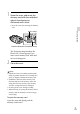
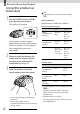
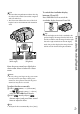
Table Of Contents
- Cover
- GB
- IMPORTANT SAFETY INSTRUCTIONS
- Read this first
- Table of contents
- Getting started
- Binoculars/Recording/Playback
- Saving movies and photos
- Customizing this product
- Additional information
- Quick reference
- FR
- Lisez ceci avant tout
- Table des matières
- Préparation
- Jumelles/Enregistrement/Lecture
- Enregistrement de films ou de photos
- Personnalisation de cet appareil
- Informations complémentaires
- Référence rapide
- FRCA
- CONSIGNES DE SÉCURITÉ IMPORTANTES
- Table des matières
- Comment démarrer
- Jumelles/Enregistrement/Lecture
- Sauvegarde de films et de photos
- Personnalisation de ce product
- Informations complémentaires
- Référence rapide
- ES
- Lea esto antes de empezar
- Índice de contenido
- Introducción
- Binoculares/grabación/reproducción
- Guardar películas y fotografías
- Personalizar el producto
- Información complementaria
- Referencia rápida
- ESUS
- Lea este apartado en primer lugar
- Índice
- Procedimientos iniciales
- Binoculares/Grabación/Reproducción
- Almacenamiento de películas y fotos
- Personalización del producto
- Información complementaria
- Referencia rápida
- GB

26
GB
Binoculars/Recording/Playback
Using this product as
binoculars
1
Set the POWER switch to ON by
pressing the green button.
This product is turned on.
Some settings screen may appear
depending on the status of this product
when it is turned on. Use this product
after completing any necessory
adjustments.
2
Make sure that the diopter, the
width, and the relative vertical
position of the right and left
viewfinder fit you (p.
21).
3
Hold this product with both
hands and aim it at the subject.
You can magnify images with the power
zoom lever.
This product adjusts the focus
automatically with the auto-focus function
(default setting).
Tips
[
SteadyShot] is set to [Active] in the default
setting.
About zooming
Magnifications available are as follows.
Binoculars magnification (approx.)
DEV-3 DEV-5/5K
Movie
recording (2D
mode)
*
1
0.8 to
10
0.8 to
20
*
2
0.8 to
10
*
3
Movie
recording (3D
mode)
*
1
0.5 to
5.4
0.5 to
5.4
Photo recording
0.5 to
10 (16:9)
0.3 to
7.5 (4:3)
0.5 to
20
*
4
(16:9)
0.3 to
15
*
4
(4:3)
Zoom ratio (approx.)
DEV-3 DEV-5/5K
Movie
recording (2D
mode)
12 24
*
2
12 *
3
Movie
recording (3D
mode)
10 10
Photo
recording
22 44
*
4
*
1
[ SteadyShot] is set to something other than
[Active]
*
2
[Digital Zoom] is set to [On] (The image
quality decreases when you use the large
magnification)
*
3
[Digital Zoom] is set to [Off]
*
4
The image quality decreases when you use the
large magnification