
Operating Guide

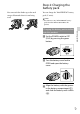
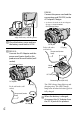
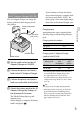
Table Of Contents
- Cover
- GB
- IMPORTANT SAFETY INSTRUCTIONS
- Read this first
- Table of contents
- Getting started
- Binoculars/Recording/Playback
- Saving movies and photos
- Customizing this product
- Additional information
- Quick reference
- FR
- Lisez ceci avant tout
- Table des matières
- Préparation
- Jumelles/Enregistrement/Lecture
- Enregistrement de films ou de photos
- Personnalisation de cet appareil
- Informations complémentaires
- Référence rapide
- FRCA
- CONSIGNES DE SÉCURITÉ IMPORTANTES
- Table des matières
- Comment démarrer
- Jumelles/Enregistrement/Lecture
- Sauvegarde de films et de photos
- Personnalisation de ce product
- Informations complémentaires
- Référence rapide
- ES
- Lea esto antes de empezar
- Índice de contenido
- Introducción
- Binoculares/grabación/reproducción
- Guardar películas y fotografías
- Personalizar el producto
- Información complementaria
- Referencia rápida
- ESUS
- Lea este apartado en primer lugar
- Índice
- Procedimientos iniciales
- Binoculares/Grabación/Reproducción
- Almacenamiento de películas y fotos
- Personalización del producto
- Información complementaria
- Referencia rápida
- GB

17
GB
Getting started
You can attach the finder cap to the neck
strap as illustrated when it is not being
used.
Step 2: Charging the
battery pack
You can charge the “InfoLITHIUM” battery
pack (V series).
Notes
You cannot use any “InfoLITHIUM” battery
pack other than NP-FV70/FV100 to this
product.
Charging the battery pack installed
into this product
Set the POWER switch to OFF
(CHG) b
y pressing the green
button.
Turn the battery cover lock to
OPEN and open the battery
cover.
Align the battery with the groove
in the battery compartment (),
and slide the battery until it clicks
().