
Network Function/Application Operating Instructions

29
Preparation for Network Operation
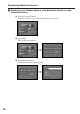
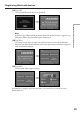
(11)Tap [OK].
The selected Bluetooth device is specified.
,
Note
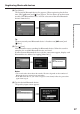
If the message “Bluetooth Registration Error Check the Passkey” appears, tap
[OK], then follow the procedure again from step 4.
(12)Tap [Exit].
The Setup screen appears again. For details of how to turn off the Modem
Adaptor with Bluetooth Function, refer to the operating instructions supplied
with the Modem Adaptor.
,
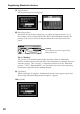
(13)Tap [Exit].
The Network Menu appears again.
,
Registration is complete and your camcorder can communicate with the selected
Bluetooth device.
Registering Bluetooth devices