
Network Function/Application Operating Instructions

12
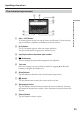
Symbol characters
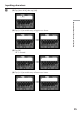
The symbol characters below are input by a single tap:
The green keys input the symbol characters.
Each tap on the key changes the symbol characters in the following orders:
Inputting characters
The available characters list
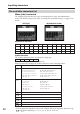
When [abc] is selected
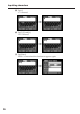
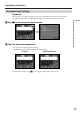
The alphabet keyboard has two types of arrangement (PC Style and Alphabetical
order). The default setting is PC Style. To change the keyboard settings, see page 17 for
details.
(PC Style) (Alphabetical order)
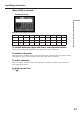
Alphabetical characters
Key Character
` ´ ˆ
* a: à t á t â t a t... A: À t Á t  t A t...
e: è t é t ê t e t... E: È t É t Ê t E t...
i: ì t í t î t i t... I: Ì t Í t Î t I t...
o: ò t ó t ô t o t... O: Ò t Ó t Ô t O t...
u: ù t ú t û t u t... U: Ù t Ú t Û t U t...
y:
´y
t y t... Y:
´
Y
t Y t...
¨ ˜
* a: ä t ã t a t... A: Ä t à t A t...
e: ë t e t... E: Ë t E t...
i: ï t i t... I: Ï t I t...
n: ñ t n t... N: Ñ t N t...
o: ö t õ t o t... O: Ö t Õ t O t...
u: ü t u t... U: Ü t U t...
y: ÿ t y t...
’ ”
’ t ” t ’ t ...
? ¿
? t ¿ t ? t ...
! ¡
! t ¡ t ! t ...
ç
Ç
ß
ç t Ç t ß t ç t...
. ,
. t , t . t ...
/ \
/ t \ t / t ...
abcdefghi jklm
nopqrstuvwxyz
ABCDEFGHI JKLM
NOPQR S TUVWXYZ
* You can input the alphabets with accent symbols. When you input the characters, tap
` ´ ˆ
or
¨ ˜
after inputting a, e, i, n, o, u, y, A, E, I, N, O, U or Y.
~–_
@
: