
Network Function/Application Operating Instructions


10
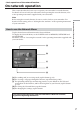
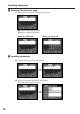
2 Selecting the character type
Tap [abcy123], then tap the desired character type.
abc: When inputting alphabets.
123: When inputting numbers.
When you select abc When you select 123
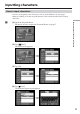
3 Inputting characters
(1) Tap the characters you want to input.
,
(2) After you input the characters, tap [Enter].
The Send screen appears again.
,
Inputting characters