
Network Function Operating Instructions

17
Introduction
Basic operations in the NETWORK mode
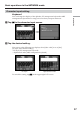
Character input setting
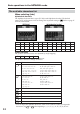
Keyboard
You can change the display of the alphabet, PC arrangement keyboard or ABC
arrangement keyboard into a setup you want when you input characters.
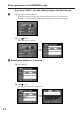
1 Tap in the character input screen.
,
2 Tap the desired setting.
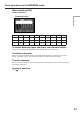
You can set as the following two displays when [abcy123] is set as [abc].
(PC Style is the default setting.)
– PC Style (PC arrangement keyboard)
– Alphabetical order (ABC arrangement keyboard)
To switch the setting, tap on the upper-right LCD screen.
Alphabetical orderPC Style