
Digital Camera User Manual
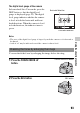
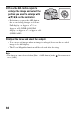
Table Of Contents
- Notes on using your camera
- Table of Contents
- Preparing the camera
- Before your operation
- Shooting images
- Using the shooting function
- Selecting the focus method
- Using autofocus
- Shooting with your desired composition (Focus-lock)
- Selecting the focus method to suit the movement of the subject (Autofocus Mode)
- Selecting the focus area (AF area)
- Adjusting the focus manually (Manual focus)
- Composing your shot using the image sensor (Focus check Live View)
- Checking the focus by enlarging the image
- Detecting faces
- Using the flash
- Adjusting the brightness of the image (Exposure, Flash compensation, Metering)
- Shooting with fixed brightness (AE Lock)
- Using brightness compensation for the entire image (Exposure compensation)
- Adjusting the amount of flash light (Flash Compensation)
- Selecting the flash control mode to set the amount of flash light (Flash control)
- Selecting the method for measuring the brightness of a subject (Metering Mode)
- Setting ISO
- Compensating for the brightness and contrast automatically (D-Range)
- Image processing
- Adjusting the color tones (White balance)
- Selecting the drive mode
- Selecting the focus method
- Using the viewing function
- Changing your setup
- Viewing images on a computer
- Printing images
- Others
- Index

94
Note
• This function cannot be used when [Func. of AEL button] in the Custom menu is
set to [AEL].
3 Press the AEL button again to
enlarge the image and select the
portion you want to enlarge with
v/V/b/B on the controller.
• Each time you press the AEL button,
the zoom scaling changes as follows:
Full display t Approx. ×7.5 t
Approx. ×15 (DSLR-A580)/Full
display t Approx. ×7 t Approx. ×14
(DSLR-A560)
4 Adjust the focus and shoot the subject.
• You can record images when an image is enlarged, however the recorded
image is for full display.
• The Focus Magnifier function will be released after shooting.