
Digital Camera User Manual
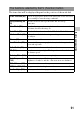
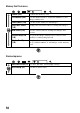
Table Of Contents
- Notes on using your camera
- Table of Contents
- Preparing the camera
- Before your operation
- Shooting images
- Using the shooting function
- Selecting the focus method
- Using autofocus
- Shooting with your desired composition (Focus-lock)
- Selecting the focus method to suit the movement of the subject (Autofocus Mode)
- Selecting the focus area (AF area)
- Adjusting the focus manually (Manual focus)
- Composing your shot using the image sensor (Focus check Live View)
- Checking the focus by enlarging the image
- Detecting faces
- Using the flash
- Adjusting the brightness of the image (Exposure, Flash compensation, Metering)
- Shooting with fixed brightness (AE Lock)
- Using brightness compensation for the entire image (Exposure compensation)
- Adjusting the amount of flash light (Flash Compensation)
- Selecting the flash control mode to set the amount of flash light (Flash control)
- Selecting the method for measuring the brightness of a subject (Metering Mode)
- Setting ISO
- Compensating for the brightness and contrast automatically (D-Range)
- Image processing
- Adjusting the color tones (White balance)
- Selecting the drive mode
- Selecting the focus method
- Using the viewing function
- Changing your setup
- Viewing images on a computer
- Printing images
- Others
- Index

56
Memory Card Tool menu
Clock setup menu
Format (145) Formats the memory card.
File Number (144) Sets the method used to assign file numbers to still
images and movies.
Folder Name (144) Sets the folder format for still images.
Select REC Folder
(145)
Changes the selected folder for storing still images.
New Folder (145) Creates a new folder for storing still images and
movies.
Recover Image DB
(146)
Recovers the image database file for movies and
enables recording and playback.
Display Card Space
(146)
Displays the remaining recording time of movies and
the recordable number of still images on the memory
card.
Date/Time Setup (31) Sets date and time, and daylight savings.
Area Setting (32) Sets the location of use.