
Digital Camera User Manual
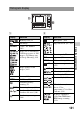
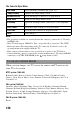
Table Of Contents
- Notes on using your camera
- Table of Contents
- Preparing the camera
- Before your operation
- Shooting images
- Using the shooting function
- Selecting the focus method
- Using autofocus
- Shooting with your desired composition (Focus-lock)
- Selecting the focus method to suit the movement of the subject (Autofocus Mode)
- Selecting the focus area (AF area)
- Adjusting the focus manually (Manual focus)
- Composing your shot using the image sensor (Focus check Live View)
- Checking the focus by enlarging the image
- Detecting faces
- Using the flash
- Adjusting the brightness of the image (Exposure, Flash compensation, Metering)
- Shooting with fixed brightness (AE Lock)
- Using brightness compensation for the entire image (Exposure compensation)
- Adjusting the amount of flash light (Flash Compensation)
- Selecting the flash control mode to set the amount of flash light (Flash control)
- Selecting the method for measuring the brightness of a subject (Metering Mode)
- Setting ISO
- Compensating for the brightness and contrast automatically (D-Range)
- Image processing
- Adjusting the color tones (White balance)
- Selecting the drive mode
- Selecting the focus method
- Using the viewing function
- Changing your setup
- Viewing images on a computer
- Printing images
- Others
- Index

138
The items for Sync Menu
Notes
• The operations available are restricted when the camera is connected to a TV using
an HDMI cable.
• Only TVs that support “BRAVIA” Sync can provide these operations. The SYNC
Menu operations differ depending on the TV connected. For details, refer to the
operating instructions supplied with the TV.
• If the camera performs unnecessary operations in response to the TV Remote
Control when the camera is connected to another manufacturer’s TV using an HDMI
connection, set [CTRL FOR HDMI] in the Setup menu to [Off].
When you view images on a TV screen, the camera and TV must use the
same TV color system.
NTSC system (1080 60i)
Bahama Islands, Bolivia, Canada, Central America, Chile, Colombia, Ecuador,
Jamaica, Japan, Korea, Mexico, Peru, Surinam, Taiwan, the Philippines, the U.S.A.,
Venezuela, etc.
PAL system (1080 50i)
Australia, Austria, Belgium, China, Croatia, Czech Republic, Denmark, Finland,
Germany, Holland, Hong Kong, Hungary, Indonesia, Italy, Kuwait, Malaysia, New
Zealand, Norway, Poland, Portugal, Rumania, Singapore, Slovak Republic, Spain,
Sweden, Switzerland, Thailand, Turkey, United Kingdom, Viet Nam, etc.
PAL-M system (1080 50i)
Brazil
Slide Show Plays back images automatically (page 127).
1 Image Display Returns to the single-image screen.
Still/Movie Select Selects still images or movies to be played back.
Image Index Switches to the image index screen.
3D Viewing Plays back 3D-images when connected to a 3D-compatible
TV.
Select Folder Selects the folder of images to be played back.
Select Date Selects the date of movies to be played back.
Delete Deletes images.
To use your camera abroad