
User Guide Digital Single Lens Reflex Camera SLR-A100
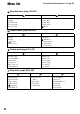
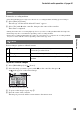
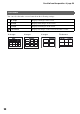
Table Of Contents
- Table of contents
- Notes on using your camera
- Basic techniques for better images
- Before your operation
- Using the shooting functions
- Using the viewing functions
- Using the menu
- Using your computer
- Printing images
- Troubleshooting
- Others
- Index

82
For details on the operation
1
page 80
Menu list
Recording menu (pages 83 to 87)
Playback menu (pages 88 to 92)
Custom menu (pages 93 to 97)
Setup menu (pages 98 to 104)
12
Image size
Quality
Inst.Playback
Noise reductn
Eye-Start AF
Red eye
Flash control
Flash default
Bracket order
Reset
12
Delete
Format
Protect
Index format
Slide show
DPOF set
• Date imprint
• Index print
• Cancel print
12
Priority setup
FocusHoldButt.
AEL button
Ctrl dial set
Exp. comp. set
AF illuminator
Shutter lock
Shutter lock
AF area setup
Monitor Disp.
Rec. display
Play. display
123
LCDbrightness
Transfer mode
Video output
Audio signals
Language
Date/Time set
File # memory
• Reset
Folder name
Select folder
• New folder
LCD backlight
Power save
MenuSec.Memory
Delete conf.
Clean CCD
Reset default