
User Guide Digital Single Lens Reflex Camera SLR-A100
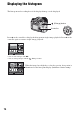
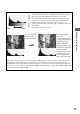
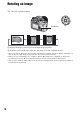
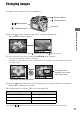

Table Of Contents
- Table of contents
- Notes on using your camera
- Basic techniques for better images
- Before your operation
- Using the shooting functions
- Using the viewing functions
- Using the menu
- Using your computer
- Printing images
- Troubleshooting
- Others
- Index

74
Displaying the histogram
The histogram and recording data of the displayed image can be displayed.
Press v on the controller to display the histogram in single-image playback. Press v on the
controller again to return to single-image playback.
• You can select images with b/B.
• You can enlarge images with the (Enlarge) button.
(Enlarge) button
Controller
When the image has a high-key or low-key portion, that portion is
illuminated on the histogram display (Luminance limit warning).