
User Guide Digital Single Lens Reflex Camera SLR-A100
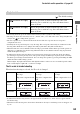
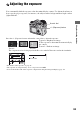
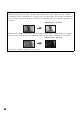
Table Of Contents
- Table of contents
- Notes on using your camera
- Basic techniques for better images
- Before your operation
- Using the shooting functions
- Using the viewing functions
- Using the menu
- Using your computer
- Printing images
- Troubleshooting
- Others
- Index

66
z Shooting techniques
While shooting images, the camera automatically determines the exposure. When shooting a whitish
overall image such as a backlit subject or a snowy scene, the camera judges that the subject is bright and
may set a darker exposure for the image. In such cases, adjustment of the exposure in the + plus direction
is effective.
When shooting a darker overall image, the camera judges that the subject is dark and may set a brighter
exposure for the image. In such cases, adjustment of the exposure in the – minus direction is effective.
You can try to adjust the exposure to suit your taste.
Adjust in the + direction
Adjust in the – direction