
User Guide Digital Single Lens Reflex Camera SLR-A100
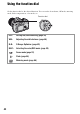
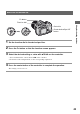

Table Of Contents
- Table of contents
- Notes on using your camera
- Basic techniques for better images
- Before your operation
- Using the shooting functions
- Using the viewing functions
- Using the menu
- Using your computer
- Printing images
- Troubleshooting
- Others
- Index

42
Using the function dial
Set the function dial to the desired function. You can set the focus frame, AF mode, metering
mode, flash compensation, color mode, etc.
ISO: Setting ISO/Zone Matching (page 44)
WB: Adjusting the white balance (page 46)
D-R: D-Range Optimizer (page 49)
DEC: Selecting the color/DEC mode (page 49)
: Focus mode (page 51)
: Flash (page 54)
: Metering mode (page 58)
Function dial