
User Guide Digital Single Lens Reflex Camera SLR-A100
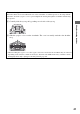
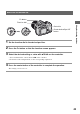

Table Of Contents
- Table of contents
- Notes on using your camera
- Basic techniques for better images
- Before your operation
- Using the shooting functions
- Using the viewing functions
- Using the menu
- Using your computer
- Printing images
- Troubleshooting
- Others
- Index

41
Using the shooting functions
To attach the eyepiece cover
When the shutter is released without the use of the viewfinder, as in bulb exposure or shooting with the
self-timer, attach the eyepiece cover to prevent light from entering through the viewfinder and affecting
the exposure.
1 Carefully slide the eyecup off by pushing on each side of the eyecup.
2 Slide the eyepiece cover over the viewfinder. The cover is normally attached to the shoulder
strap.
• When attaching the eyepiece cover, the eyepiece sensors located below the viewfinder may be activated
depending on the situation, and the focus may be adjusted or the LCD monitor may continue to flash.
Setting [Eye-Start AF] to [Off] prevents this problem (page 85).