
User Guide Digital Single Lens Reflex Camera SLR-A100
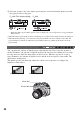
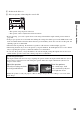
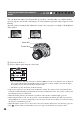
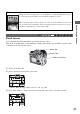
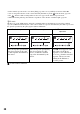

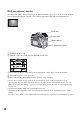
Table Of Contents
- Table of contents
- Notes on using your camera
- Basic techniques for better images
- Before your operation
- Using the shooting functions
- Using the viewing functions
- Using the menu
- Using your computer
- Printing images
- Troubleshooting
- Others
- Index

37
Using the shooting functions
Manual exposure
You can manually adjust the shutter speed and aperture values.
This mode is useful when you maintain the setting of the shutter speed and the aperture value
or when you use an exposure meter.
1 Set the mode dial to M.
2 Select a shutter speed using the control dial.
• “BULB” (Bulb shooting) is indicated next to “30” (page 40).
3 Press and hold the +/– (Exposure) button and turn the control dial to select the aperture.
z Shooting techniques
When shooting a moving person, car, or spindrift, etc., using the high shutter speed,
you can express moment that is beyond what the human eye can see.
When shooting a subject such as the flow of a river at a slower shutter speed, you can
create an image that captures the subject’s flowing movement. In such cases, use of a
tripod is recommended to prevent camera shake.
Shooting with manual exposure mode
P A S M
Mode dial
Control dial
+/– (Exposure) button