
User Guide Digital Single Lens Reflex Camera SLR-A100
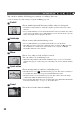
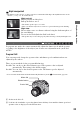
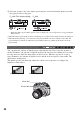
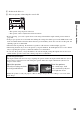
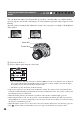
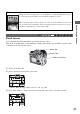
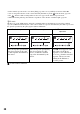

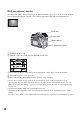
Table Of Contents
- Table of contents
- Notes on using your camera
- Basic techniques for better images
- Before your operation
- Using the shooting functions
- Using the viewing functions
- Using the menu
- Using your computer
- Printing images
- Troubleshooting
- Others
- Index

33
Using the shooting functions
Night view/portrait
• The shutter speed is slower, so using a tripod is recommended. The Super SteadyShot function is also
effective. (
t step 5 in “Read This First”)
In program auto mode, the camera automatically adjusts the shutter speed and the aperture
according to the brightness of the subject just as in the auto adjustment mode (mode dial:
AUTO).
Program Shift
You can temporarily change the aperture value and shutter speed combination that was
adjusted by the camera.
There are two methods for the program shift function.
P
S
shift: You can choose the desired shutter speed. The aperture value is adjusted
automatically. This setting is the default setting.
P
A
shift: You can choose the desired aperture value. The shutter speed is adjusted
automatically.
• You can switch the P
S
shift and the P
A
shift with [Ctrl dial set] in the Custom menu (page 94).
1 Set the mode dial to P.
2 Look into the viewfinder or press the shutter button halfway down until the shutter speed and
aperture value are displayed on the LCD monitor.
Night portrait
Shoots portraits in dark places.
Pull up the flash to use it.
• The shutter speed is up to 2 seconds.
• Take care that the subject does not move to prevent the image from blurring.
Night view
Shoots night scenes at a distance without losing the dark atmosphere of
the surroundings.
Do not use the flash (Push the flash back down).
• The picture may not be taken properly when shooting a wholly dark night scene.
Shooting with Program auto
P A S M
Shutter button
Control dial
Mode dial