
User Guide Digital Single Lens Reflex Camera SLR-A100
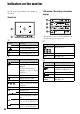
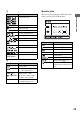
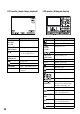


Table Of Contents
- Table of contents
- Notes on using your camera
- Basic techniques for better images
- Before your operation
- Using the shooting functions
- Using the viewing functions
- Using the menu
- Using your computer
- Printing images
- Troubleshooting
- Others
- Index

23
Before your operation
C
D
Operation guide
The next operation may be indicated on the
lower portion of the LCD monitor.
Display Indication
Color mode (49)
+1 Contrast (50)
+1 Saturation (50)
+1 Sharpness (50)
D-range optimizer (49)
Metering (58)
AF area (51)
AF mode (53)
RP Release priority (93)
Drive mode (60)
Image size (83)
FINE STD
RAW RAW+
Image quality (83)
Display Indication
AE lock (67)
Battery remaining (
t step
1 in “Read This First”)
AWB +1
5500K M1
White balance (Auto,
Preset, Color temperature,
CC filter, Custom) (46)
0039 Remaining number of
recordable images (27)
Display Indication
Controller bB
Controller vV
Controller vVbB
z Center of the controller
Control dial
Returns with MENU
Returns with (77)
Switches folder frame and
image frame in file browser
(72)