
User Guide Digital Single Lens Reflex Camera SLR-A100
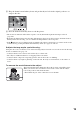
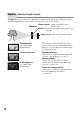
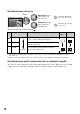
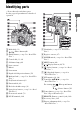
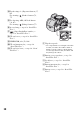
Table Of Contents
- Table of contents
- Notes on using your camera
- Basic techniques for better images
- Before your operation
- Using the shooting functions
- Using the viewing functions
- Using the menu
- Using your computer
- Printing images
- Troubleshooting
- Others
- Index

20
N For shooting: +/– (Exposure) button (37,
65)
For viewing: (Reduce) button (72,
77)
O For shooting: AEL (AE lock) button
(39, 67)
For viewing: (Enlarge) button (77)
P Access lamp (
t step 4 in “Read This
First”)
Q (Super SteadyShot) switch (
t
step 5 in “Read This First”)
R CF card cover (
t step 4 in “Read This
First”)
S VIDEO/USB jack (78, 108)
T CF card insertion slot (
t step 4 in
“Read This First”)
U CF card eject lever (
t step 4 in “Read
This First”)
A Tripod receptacle
• Use a tripod with a screw length of less than
5.5 mm (7/32 inch). You will be unable to
firmly secure the camera to tripods having
screws longer than 5.5 mm (7/32 inch), and
may damage the camera.
B Battery cover open lever (t step 1 in
“Read This First”)
C Lock lever (
t step 1 in “Read This
First”)
D Battery insertion slot (
t step 1 in
“Read This First”)
E Battery cover (
t step 1 in “Read This
First”)