
User Guide Digital Single Lens Reflex Camera SLR-A100
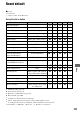
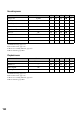
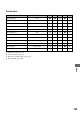
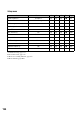

Table Of Contents
- Table of contents
- Notes on using your camera
- Basic techniques for better images
- Before your operation
- Using the shooting functions
- Using the viewing functions
- Using the menu
- Using your computer
- Printing images
- Troubleshooting
- Others
- Index

154
Setup menu
A: AUTO shooting (page 31)
B: Scene Selection (page 32)
C: Reset of recording function (page 87)
D: Reset default (page 104)
Items Reset to A B C D Page
LCD brightness Standard
aaaz
98
Transfer mode Mass Storage
aaaz
98
Video output —
aaaa
98
Audio signals On
aaaz
99
Date/Time set —
aaaa
99
File # memory On
aaaz
100
Folder name Std. form
aaaz
100
Select folder —
aaaa
101
LCD backlight 5 sec.
aaaz
102
Power save 3 min.
aaaz
102
MenuSec.Memory Off
aaaz
102
Delete conf. “No”
aaaz
103