
User Guide Digital Single Lens Reflex Camera SLR-A100
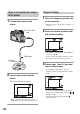
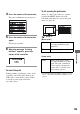

Table Of Contents
- Table of contents
- Notes on using your camera
- Basic techniques for better images
- Before your operation
- Using the shooting functions
- Using the viewing functions
- Using the menu
- Using your computer
- Printing images
- Troubleshooting
- Others
- Index

124
1 Connect the camera to the
printer.
2 Turn on your camera and the
printer.
The following screen appears.
• If the screen does not appear, press the
shutter button on the camera halfway down.
1 Select the image to print with b/B
on the controller.
• When you want to print only one image, go
to step 4.
2 Select the number of sheets with
v/V on the controller.
• The number increases up to 20 with v and
decreases with V.
• You can select the number of sheets for all
the images at the same time (page 125).
3 Repeat steps 1 and 2 if you want
to print other images.
• If you display other images, the total
number of sheets is indicated in the “Total”
field.
• You can switch between the single-image
display and the index display with the
(Display) button.
• You can enlarge the image with the
(Enlarge) button.
Stage 2: Connecting the camera
to the printer
1 To t he
USB jack
2 To th e US B
jack
USB cable
Stage 3: Printing