
User's Manual





SOLUM Newton Gateway User Manual
REV 1.6 SOLUM Proprietary 10/14
4.2 LED Status
After the Gateway is powered on by plugging in either an Ethernet Cable with PoE or a SMPS Power
Adapter (with an Ethernet Cable), LED status lights will turn on or blink depending on the current state.
1
Network
ON if Ethernet link is connected
GW checks every 1 sec. whether Ethernet link is connected.
2
2.4GHz SIL
Blinks (1 sec. duration) if the Server interface layer is operational.
GW checks the operation of the Server interface layer
3
2.4GHz TML
Blinks (3 sec. duration) if the RF MODEM is operational.
GW checks the operation of the RF MODEM interface layer
4 Not used
5 Not used
1) 2) 3) 4) 5)
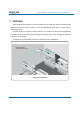
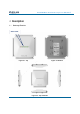
Figure 4.4. Gateway LEDs
1) Network LED
2) 2.4G SIL LED
3) 2.4G TML LED
4) Not used
5) Not used