
User's Manual Part 2





Logging on to a VPN Site
Chapter 10: Working With VPNs 235
mains open until you manually log
off the VPN site.
Logging on through the my.vpn page
• The VPN Login Status box re
Note: You do know the my.firewall page administrator’s
password in e the my.vpn page.
To manually log on to a VPN site through the my.vpn page
Direct your web br
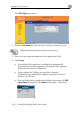
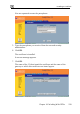
The VPN Login screen appears.
n’t need to
order to us
1. owser to http://my.vpn
2. In the Site Name list, select the site to which you want to log on.
3. Enter your user name and password in the appropriate fields.
4. Click Login.
• If the Safe@Office appliance is configured to automatically
download the network configuration, the Safe@Office appliance
downloads the network configuration.