
User's Manual Part 2





Logging on to a VPN Site
234 Check Point Safe@Office User Guide
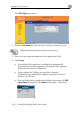
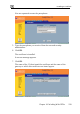
The VPN Login page appears.
2. From the Site Name list, select the site to which you want to log on.
Note: Disabled VPN sites will not appear in the Site list.
3. Enter your user name and password in the appropriate fields.
4. Click Login.
• If the Safe@Office appliance is configured to automatically
download the network configuration, the Safe@Office appliance
downloads the network configuration.
ed a network
ion, the Safe@Office appliance attempts to create a
tunnel to the VPN site.
• Once the Safe@Office appliance has finished connecting, the VPN
Login Status box appears. The Status field displays “Connected”.
• If when adding the VPN site you specifi
configurat