
User's Manual Part 2





Logging on to a VPN Site
Chapter 10: Working With VPNs 233
Logging on to a VPN Site
You need to manually log on to Remote Access VPN Servers config
Manual Login. You do not need to manually log on to a Remote Acc
Server conf
the comput
ured for
ess VPN
igured for Automatic Login or a Site-to-Site VPN Gateway: all
ers on your network have constant access to it.
Manual Login can be done through either the Safe@Office Portal or the
my.vpn page. When you log on and traffic is sent to the VPN site, a VPN
se
ork,
tunnel is established. Only the computer from which you logged on can u
the tunnel. To share the tunnel with other computers in your home netw
you must log on to the VPN site from those computers, using the same user
name and password.
Note: You must use a single user name and pass
destination gateway.
word for each VPN
Logging on through the Safe@Office Portal
Note: Y
@Office Portal
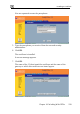
1. Click VPN in the main menu, and click the VPN Login tab.
ou can only login to sites that are configured for Manual Login.
To manually log on to a VPN site through the Safe