
User's Manual Part 2





Deleting a VPN Site
Chapter 10: Working With VPNs 231
Table 35: PPPoE Login Fields
In this field… Do this…
User The PPPoE username.
Password Th
Service The service name configured in the PPPoE server.
You on re than
on
Note: eld, the first PPPoE
se d.
e PPPoE password.
ly need to fill in this field if there is mo
e PPPoE server in the WAN network.
If you do not fill in this fi
rver found is use
Deleting a VPN Site
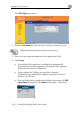
enu, and click the VPN Sites tab.
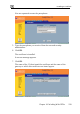
ears, with a list of VPN sites.
To delete a VPN site
1. Click VPN in the main m
The VPN Sites page app
2. In the desired VPN site’s row, click the Delete
icon.
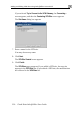
A confirmation message appears.
3. Click OK.
The VPN site is de
leted.