
User's Manual Part 2






Adding and Editing VPN Sites using Safe@Office 110 and 225
228 Check Point Safe@Office User Guide
Tabl Fields
In this field… Do this…
e 34: VPN Authentication
Topology User Type the topology user’s user name.
Topology
Password
Type the topology user’s password.
Use Shared
S
Type the shared secret to use for secure
e.
VPN sites to each other. The secret can contain
spaces and special characters.
ecret communications with the VPN sit
This shared secret is a string used to identify the
alog box appears.
Creating a PPPoE Tunnel
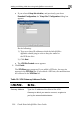
If you selected PPPoE, the VPN Network Configuration di
1. Complete the fields using the information in VPN Network
Configuration Fields on page 215.
2. Click Next.