
User's Manual Part 2





Viewing Connections
Chapter 6: Viewing Reports 147
ing tions
View Connec
This option allow ween your
network and the ext played as a
list, specifying s r rt, and the
protocol used (T P
To view the activ
• Click Rep ns
tab.
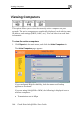
The Active Connecti
s you to view the currently active connections bet
ernal world. The active connections are dis
ou ce IP address, destination IP address and po
C , UDP, etc.).
e connections
orts in the main menu, and click the Active Connectio
ons page appears.
You can do the following:
• Click the Refresh button to refresh the display.
• To view information on the destination machine, click its IP
address.
The Safe@Office appliance queries the Internet WHOIS server, and a
window displays the name of the entity to whom the IP address is
registered and their contact information.