
User's Manual Part 2




Adding and Editing VPN Sites using Safe@Office 110 and 225
210 Check Point Safe@Office User Guide
entication Method
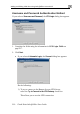
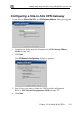
Username and Password, the VPN Login dialog box appears.
Username and Password Auth
If you selected
1. Complete the fields using the information in VPN Login Fields on
page 217.
2. Click Next.
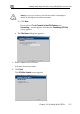
• If you select dialog box appears. ed Automatic Login, the Connect
Do the following:
1) To try to connect to the Remote Access VPN Server,
select the Try to Connect to the VPN Gateway check box.
This allows you to test the VPN connection.