
User's Manual Part 2


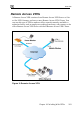




Adding and Editing VPN Sites using Safe@Office 110 and 225
Chapter 10: Working With VPNs 209
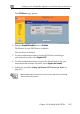
• If you chose Specify Configuration, a second VPN Network
Configuration dialog box appears.
e fields using the information in VPN Network
n Fields on page 215 and click Next.
Complete th
Configuratio
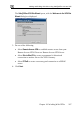
• The Authentication Method dialog box appears.
5. Complete the fie
Methods Fields
6. Click Next.
lds using the information in Authentication
on page 216.