
User's Manual Part 2

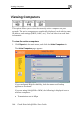




Viewing Computers
146 Check Point Safe@Office User Guide
Note: To increase the number of computers allowed by your
must upgrade your product. For further information, see Up
license, you
grading
2. h.
imit window appears with installed software product and
Your Software Product on page 258.
To refresh the display, click Refres
3. To view node limit information, do the following:
a. Click Node Limit.
The Node L
the number of nodes used.
b. Click Close to close the window.