
User's Manual Part 2






Setting Up Your Safe@Office Appliance as a Remote Access VPN Server
Chapter 10: Working With VPNs 205
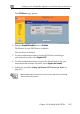
The VPN Server page appears.
2. Drag the Enabled/Disabled lever to Enabled.
The Remote Access VPN Server is enabled.
The check box is enabled.
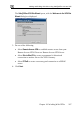
3. To allow authenticated users to bypass N T when connecting to
4. ss your
pass the firewall.
5. Follow the procedure Setting Up Remote VPN Access for Users on
page 25
A
your internal network, select Bypass NAT.
To allow authenticated users to bypass the firewall and acce
internal network without restriction, select By
2.
Note: Disabling the Remote Access VPN Server will cause all existing
VPN tunnels to d
isconnect.