
User's Manual Part 2






Setting Up Your Safe@Office Appliance as a Remote Access VPN Server
204 Check Point Safe@Office User Guide
To cre wo VPN sites
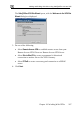
1. On the remote user VPN site's Safe@Office appliance, add the
office Remote Access VPN Server as a Remote Access VPN site.
See Adding and Editing VPN Sites on page 206.
The remote user's Safe@Office appliance will act as a Remote Access
VPN Client.
2. On the office VPN site's Safe@Office appliance, enable the Remote
Access VPN Server.
See Setting Up Your Safe@Office Appliance as a Remote Access VPN
Server on page 204.
Setting Up Your Safe@Office Appliance
as a Remote Access VPN Server
ate a Remote Access VPN with t
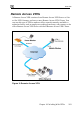
You can make your network remotely available to authorized users by setting
up your Safe@Office appliance as a Remote Access VPN Server. Remote
erver via Check Point
mode.
access users can connect to the Remote Access VPN S
SecuRemote or a via Safe@Office appliance in Remote Access VPN
Note: The Check Point SecuRemote Remote Access VPN Client can be
downloaded for free from
http://www.checkpoint.com/techsupport/downloads_sr.html
To set up your Safe@Office appliance as a Remote Access VPN
Server
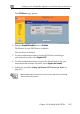
1. Click VPN in the main menu, and click the VPN Server tab.