
User's Manual Part 2






Overview
200 Check Point Safe@Office User Guide
using Remote Access VPN Clients, such as Check Point
SecuRemote. Unless the Remote Access VPN Server is also a
Remote Access VPN Client, it cannot initiate a connection to other
• Site-to-Site VPN connect with another Site-to-Site
VPN Gateway in a permanent, bi-directional relationship.
• Remote Access N
Server, but othe
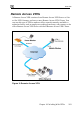
Remote Access
Client is a hardw
Safe@Office 105 a llowing
a single remote employee to securely work from home or on the road.
Safe@Office 110 and 225 provide full VPN functionality. They can act as a
Remote Access VP ers,
or a Site-to-Site VP ay.
depends on the type or Remote
Access.
VPN sites.
Gateway - Can
VPN Client - Can connect to a Remote Access VP
r VPN sites cannot initiate a connection to the
VPN Client. Defining a Remote Access VPN
are alternative to using SecuRemote software.
cts as a Remote Access VPN Server for one user, a
N Client, a Remote Access VPN Server for multiple us
N Gatew
A virtual private net
VPN Server or gate
work (VPN) must include at least one Remote Access
way. The type of VPN sites you include in a VPN
of VPN you want to create, Site-to-Site
Note: A d Remote Access VPN Server or gateway must
have a static IP address. If you need a Remote Access VPN Server or
gatewa curity
Manage
ecu ve a
manage
locally manage
y with a dynamic IP address, you must use SofaWare Se
ment Portal (SMP) management.
A S
dynamic IP addr
Remote or Safe@Office Remote Access VPN Client can ha
ess, regardless of whether it is locally or remotely
d.
Note: This chapter explains how to define a VPN locally. However, if
your appliance is centrally managed by a Service Center, then the
Service Center can automatically deploy VPN configuration for your
appliance.