
User's Manual Part 2



Checking Antivirus Compliancy
Chapter 9: Using SecureDesk 193
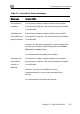
Message Explanation
SecureDesk is
not compliant
The antivirus software does not comply with the
SecureDesk security level conditions, and access
through the firewall is blocked.
Check the SecureDesk security level conditions, and
make changes to your antivirus software accordingly.
For information on SecureDesk security levels, see
Setting the SecureDesk Security Level on page 186.
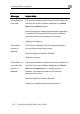
SecureDesk
scann
install
ngine and virus signatures are installed,
irus scanner is not.
Secu
installed firewall is blocked.
Install the antivirus software.
st
responding.
er not
The antivirus e
but the antiv
ed
Access through the firewall is blocked.
Install the scanner.
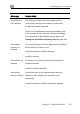
reDesk not VirusScan is not installed, and access through the
SecureDesk SecureDesk has not yet determined the antivirus
ate is unknown software's state, because the computer is not
Access through the firewall is temporarily blocked.