
User's Manual Part 2
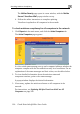



Checking Antivirus Compliancy
192 Check Point Safe@Office User Guide
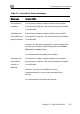
Message Explanation
Secu
up
oftware components' version numbers are
reDesk not The antivirus s
-to-date
less than the version numbers displayed in the Service
Status table's Minimum column.
Access through the firewall may be blocked, depending
on whether the SecureDesk security level conditions
require that the antivirus software is up-to-date.
Update your software.
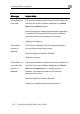
S
scann
ecureD sk
er is
bled, and the computer/network is
not currently protected from viruses.
SecureDesk not
up-to-date and
sc
di
The antivirus software components' version numbers are
less than the version numbers displayed in the Service
Minimum column, and the scanner is
tly
Access through the firewall is blocked.
software and enable the scanner.
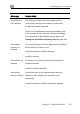
e
The scanner is disa
disabled
Access through the firewall is blocked.
Enable the scanner.
anner is
Status table's
sabled disabled. The computer/network is not curren
viruses. protected from
Update your