
User's Manual Part 2



Checking Antivirus Compliancy
190 Check Point Safe@Office User Guide
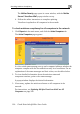
The McAfee Security page opens in a new window, with the McAfee
To ch network
1. tab.
Th
Secure-1 VirusScan ASaP popup window on top.
b. Follow the online instructions to complete updating.
VirusScan is updated on all computers in the network.
eck antivirus compliancy for all computers in the
Click Reports in the main menu, and click the Active Computers
e Active Computers page appears.
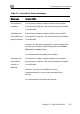
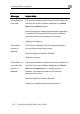
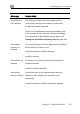
A color-coded status message next to each computer indicates whether t
computer complies with the SecureDesk security level conditions. For a
explanation of the status messages and their colors, see the tables below.
2. To view detailed information about the antivirus status and
he
n
component versions, point to the status message.
red information.
software on all computers in the
network.
For instructions, see Updating McAfee VirusScan ASaP on All
Computers on page 186.
A popup window displays the desi
3. If necessary, update the antivirus