
User's Manual Part 2






Viewing Computers
144 Check Point Safe@Office User Guide
V
iewing Computers
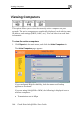
This option allows you to view the currently acti
network. The active computers are graphically d
ve computers on your
isplayed, each with its name,
IP e limit
information.
1. Click Reports in the main menu, and click the Active Computers tab.
The Active Computers page appears.
address, and settings (DHCP, Static, etc.). You can also view nod
To view the active computers
If you configured High Availability, both the master and backup
appliances are shown.
If you are using Safe@Office 300W, the following is displayed next to
wireless computers:
• Transmission rate in Mbps